
Best Leather Backpack for a 16-Inch MacBook Pro: What Actually Fits (2026)

Fit guide · measured, not guessed
A 16-inch MacBook Pro is 35.57 cm wide. Here is what actually takes it.
The 16-inch MacBook Pro is the widest laptop Apple has sold in a decade, and it is the machine that makes people read three listings before they order. This guide does the arithmetic most listings skip: what the shell measures, what the padded sleeve measures, and how much room is left once the zip closes — then shows you every bag we stock that is tagged for a machine this size.
- The three numbers that decide fit — and which one to ask us for
- Eight bags and sleeves, all in stock, tagged for 15.6-inch, 16-inch and 17-inch machines
- Why the sleeve figure matters more than the bag size on the label
- Where the 140W charger goes, since it is the second-heaviest thing you carry
The chassis
First, the exact size of the thing you are trying to fit
The 16-inch MacBook Pro that Apple has sold since late 2021 — M1 Pro through the current M-series chips — measures 1.68 cm high, 35.57 cm wide and 24.81 cm deep, and weighs 2.1 kg in the M1 Pro trim, 2.2 kg in the M1 Max. Those dimensions have not moved across generations, which is good news: a bag that fits a 2021 16-inch fits the 2026 one.
| Machine | Width | Depth | Thickness | Weight |
|---|---|---|---|---|
| MacBook Pro 16" (2021 and later) | 35.57 cm | 24.81 cm | 1.68 cm | 2.1–2.2 kg |
| MacBook Pro 16" (2019, Intel) | 35.79 cm | 24.59 cm | 1.62 cm | 2.0 kg |
| MacBook Pro 14" (2021 and later) | 31.26 cm | 22.12 cm | 1.55 cm | 1.6 kg |
| MacBook Air 15" (2023 and later) | 34.04 cm | 23.76 cm | 1.15 cm | 1.51 kg |
Source: Apple technical specifications. The 2019 Intel 16-inch is 2 mm wider again — worth knowing if you carry a refurbished one.
The important line in that table is the third one. The 16-inch is 4.31 cm wider and 2.69 cm deeper than the 14-inch. That is not a rounding difference you can squeeze past. It is the reason a sleeve sold as "fits MacBook Pro 14 inch" will not accept a 16-inch machine no matter how soft the leather feels, and it is the single most common source of returns on laptop bags.
The label problem
Why "fits 17-inch laptop" tells you almost nothing
Three different measurements get called "the size of the bag", and listings mix them freely.
| What is measured | Typical gap to the real limit | Why it misleads |
|---|---|---|
| Shell dimensions — the outside of the bag | 1–3 cm optimistic | Leather panels, piping and a padded back panel all sit inside the shell. A 38 cm shell is not a 38 cm opening. |
| Padded sleeve — the lined compartment at the back | the real limit | This is the only figure that matters, and it is the one listings leave out most often. |
| Zip or flap opening — the mouth you post the laptop through | 1–2 cm less than the sleeve | A curved flap closure narrows the mouth at the corners, which is exactly where the laptop's corners arrive first. |
| "Fits 17-inch" — a class label, not a measurement | varies by 4 cm | A 17-inch laptop chassis runs from about 39 to 41 cm wide depending on the model. The label covers a range, not a number. |
Read the label as a category, then find the number. If the listing gives no sleeve measurement, ask before you buy.
That gap between the three measurements is why we tag every bag with a device size rather than a bag size. A 16-inch MacBook Pro sits in the 15.6-inch and 17-inch classes: both are cut for machines at least as wide as yours, which is why they are the two collections worth opening first.
Before you buy
Four measurements, five minutes, zero returns
You do not need to trust a label. You need a ruler and the bag's stated numbers. This is the order that catches the most failures.
Measure your own machine
Width, depth and thickness at the widest point — the rubber feet and the lid lip count. Write the three numbers on your phone.
1 minFind the sleeve figure
Not the shell. If the listing only gives an outer size, subtract 2–3 cm for panels and padding, then ask us to confirm.
2 minCheck the mouth
A flap bag loses width at the corners. If the sleeve is 36.5 cm and the mouth is 35 cm, the laptop goes in at an angle or not at all.
1 minBudget the charger
The 16-inch ships with a 140W USB-C brick. Coiled with its cable it needs a pocket of roughly 10 × 10 cm and 4 cm deep — or a separate pouch.
1 minStep four is the one people skip, and it is why a bag that fits the laptop perfectly still ends up with the charger loose in the main compartment, grinding against the lid. If the bag has no charger pocket, plan for a small pouch; if it has one, check it is on the outside, where a heavy brick does not press on the screen.
Our range, by device size
Eight bags that take a 16-inch MacBook Pro, in stock now
Every bag below is tagged for the largest machine it is built to hold, and every one of them is in stock as this is published. The 15.6-inch group is cut for laptops in the same width class as a 16-inch MacBook Pro; the 17-inch group is cut wider again, which is where you go if you want visible slack.
| Bag | Tagged for | From | Colours | Stock |
|---|---|---|---|---|
|
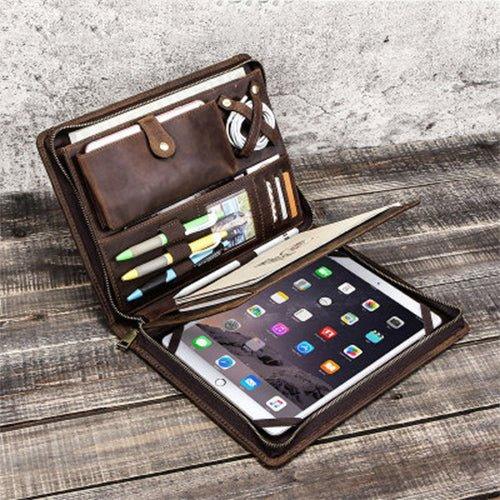
Crazy Horse Leather Bag, 16-inch MacBook Pro A zip case, not a backpack |
15.6" | $164.16 | 1 | In stock |
|
Crazy Horse Leather Sleeve, 16.2" model Slides inside another bag |
16.2" | $115.95 | 1 | In stock |
|
Vintage Leather Backpack, 16-inch laptop Full-grain, padded back panel |
15.6" | $278.54 | 2 | In stock |
|
Leather Briefcase for Men, 16-inch laptop Most margin of anything here |
15.6" | $263.05 | 3 | In stock |
|
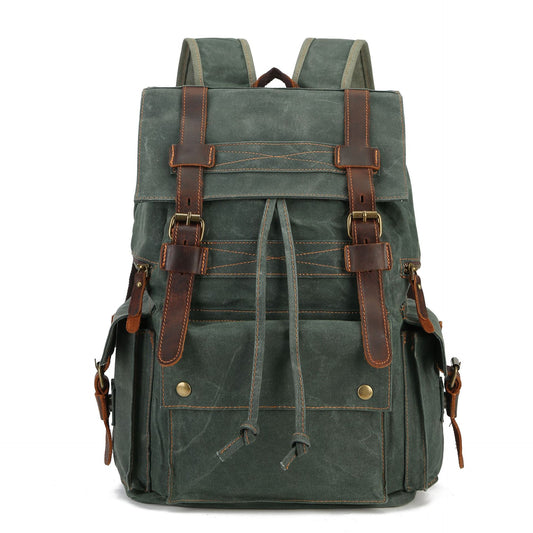
Waxed Canvas Backpack, 16-inch laptop Loads long-edge down; see the note below |
16" | $142.60 | 3 | In stock |
|
Leather Roll-Top Backpack with Front Pocket Roll-top, expands upward |
17" | $119.69 | 3 | In stock |
|
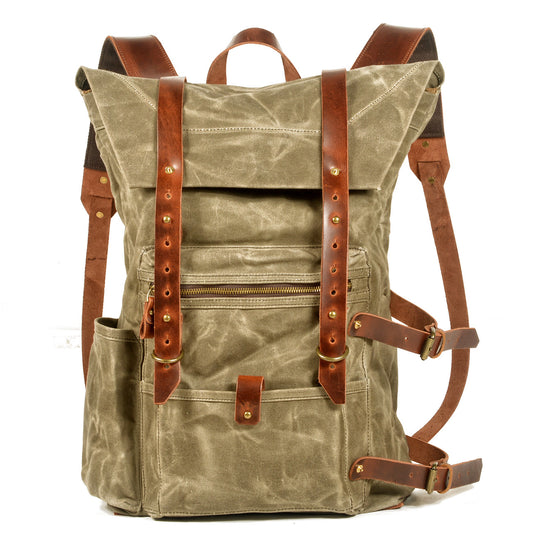
Waxed Canvas Roll-Top Laptop Backpack The lightest of the 17-inch group |
17" | $114.19 | 4 | In stock |
|
Wax Canvas Rucksack with Laptop Sleeve Padded sleeve plus a wide mouth |
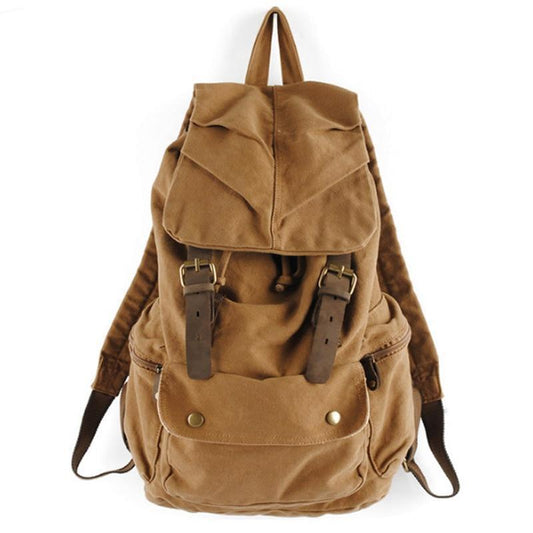
17" | $88.47 | 4 | In stock |
"Tagged for" is the device class we file the bag under in the shop menu, not an estimate. "From" is the lowest live price across colours and models. Stock read at publication.
Two things worth knowing before you pick
The sleeve comes in two models, and the model matters more than the colour. The Crazy Horse Leather Sleeve is offered as a 14-inch and a 16.2-inch model. If your machine is the 16-inch MacBook Pro, take the 16.2-inch — the 14-inch is the same leather cut for a smaller chassis and belongs with a 13- or 14-inch laptop.
"Loads long-edge down" is normal on a roll-top, and it is worth planning around. The waxed canvas 16-inch backpack opens 33 × 40 cm, so the machine rides with its long edge down the 40 cm side. The bag carries it comfortably; you simply cannot slide it out one-handed the way you would from a landscape sleeve. If you open the bag twenty times a day on a train, choose one of the roll-tops instead — they open wide at the top and the laptop stands upright.
Shop by device size
Our collections are built around the machine, not the label
This is the shortcut that saves the arithmetic. Each collection below holds only the bags tagged for that device class, so you can see the fit before you read a single dimension.
The default stop for a 16-inch machine. Backpacks, briefcases and messengers cut for laptops up to 15.6 inches — the same width class as your MacBook, and usually a couple of centimetres wider.
Cut for 17-inch laptops, so a 16-inch MacBook Pro drops in with visible slack. Worth it if you also carry a charger brick, a folder or a second device in the same compartment.
If the 16-inch stays on the desk and you travel with a 13- or 14-inch, this is the collection that keeps the bag slim instead of rattling around a big machine.
If you are between two sizes, order the larger one. A bag that is 1 cm generous looks normal; a bag that is 1 cm tight looks like a mistake every time you open it.
Carry style
Sleeve, backpack or briefcase — pick by the trip, not the trend
Best for a short commute
The 16-inch sleeve weighs almost nothing and slides into a tote or a duffle. It protects against scuffs and rain, not against being dropped — there is no structure around the lid. Choose this if you already carry a bag you like.
Best for a walk, a bike or a train
Two straps and a padded back panel take 2.1 kg off one shoulder. Look for a sleeve that holds the machine off the bottom of the bag — a 16-inch dropping 5 cm onto a table edge is how screens crack.
Best if the laptop is the small part of your day
A 41 × 30 × 9 cm briefcase gives the most clearance of anything in our range and keeps documents flat. The trade is that it is carried in the hand, which is fine for a car commute and tiring for a mile.
One more thing worth deciding early: whether the bag must stand up on its own. A soft leather backpack with a 1.68 cm laptop inside will slump forward on a chair. A structured briefcase with a flat base and rivets will not. If you present from a client's table, that is the difference you notice every day.
The charger
Where the 140W brick actually goes
The 16-inch MacBook Pro ships with a 140W USB-C power adapter, and it is the item that turns a neatly packed bag into a bag with a loose cannon in it. Three practical points:
- Give it its own pocket, outside the laptop bay. A brick pressed against the lid of a closed MacBook for a two-hour train ride is how you get pressure marks on the panel.
- Budget 10 × 10 cm and 4 cm of depth once the cable is coiled. Front zip pockets on briefcases and backpacks are usually exactly this size, which is not a coincidence — it is what they are for.
- A 2 m cable is worth more than a bigger bag. The included cable is 2 m; if you work from cafés, that decides whether you can reach the socket without moving your bag off your lap.
Shop the range
16-inch bags and sleeves, in stock
Every price and size on this page is read from the live listing. If a number here does not match what you see on the product page, the listing has been updated and the product page is right.


Prices, colours and stock reflect live product data at the time this guide was published.
Questions buyers actually ask
Frequently asked questions
Will a bag that fits a 15.6-inch laptop fit my 16-inch MacBook Pro?
Usually yes on width, and that is the confusing part. A sleeve sold for the 15.6-inch class is cut for a chassis around 38–39 cm wide, and the 16-inch MacBook Pro is 35.57 cm, so there are 2–3 cm to spare. The risk is depth: the 16-inch is 1.68 cm thick and needs at least 2.5 cm of internal depth once padding is counted. Check the depth figure, then the sleeve length.
Can I use a 14-inch sleeve for a 16-inch MacBook in an emergency?
No. A 14-inch sleeve gives 1–2 mm of clearance against a 16-inch chassis, and the aluminium corners will catch the stitching on the way in. Carry it in a padded compartment of a larger bag instead; a wrong-size sleeve scratches the machine rather than protecting it.
Does the 16-inch MacBook Pro fit in a carry-on personal item?
The laptop does — it is the bag that decides. Any backpack with a 40 cm internal width takes it. The binding constraint on a personal item is usually height and depth, not the laptop.
What is the difference between a laptop sleeve and a laptop bag?
A sleeve is padding with a zip: it protects against scratches and light rain, and it has no structure. A bag has a base, a handle or straps, and usually a charger pocket. For a 2.1 kg machine, a sleeve only makes sense inside another bag.
Will the leather stretch to fit over time?
It will soften and mould to the shape of what it holds, over months. It will not gain 4 cm of width. If the sleeve is more than about 5 mm short on width, it is the wrong size — return it rather than forcing it.
How much clearance should a leather sleeve have?
For a 16-inch MacBook Pro we recommend at least 9 mm total on the width and 7 mm on the height, plus 8 mm of depth for the lining. That sounds generous until you watch someone try to insert a laptop into a sleeve that fits exactly, one-handed, standing up.
Can the 16-inch MacBook Pro go in a backpack with a 15-inch sleeve?
A sleeve labelled 15-inch is cut for a chassis around 35 cm wide, and the machine is 35.57 cm, so it will not settle into it. Move up one class: a bag or sleeve tagged 15.6-inch or 16-inch is the right starting point, and the 17-inch collections give you visible slack on top of that.
Is 2.1 kg too heavy for a shoulder bag?
It is at the limit for a single-strap messenger carried all day. Above about 2 kg, most people start shifting the strap from shoulder to shoulder within an hour. If you commute on foot or by bike, choose two straps.
Do you state a sleeve measurement or a shell measurement?
We publish the shell dimensions, because that is what the supplier measures. So that you do not have to do the subtraction yourself, every bag is also filed under a device size — 15.6-inch, 17-inch and so on — and those collections are the fastest shortlist. If you want the internal sleeve figure for one specific bag, ask and we will measure it before you order.
Related guides
Keep reading
Not sure which one takes your machine?
Tell us the year and size of your MacBook and we will check the sleeve measurement before you order — it takes one message and saves a return.
Shop 15.6-inch bagsShop 17-inch bags