
How to Organize a Vintage Leather Briefcase: The Modern Professional's Daily Carry System (2026)

A vintage leather briefcase works best when its contents have a repeatable place. The goal is not to fill every pocket, but to create a daily carry system that protects a laptop, keeps documents flat, makes small tools reachable, and remains comfortable when the route changes from desk to train or client meeting.
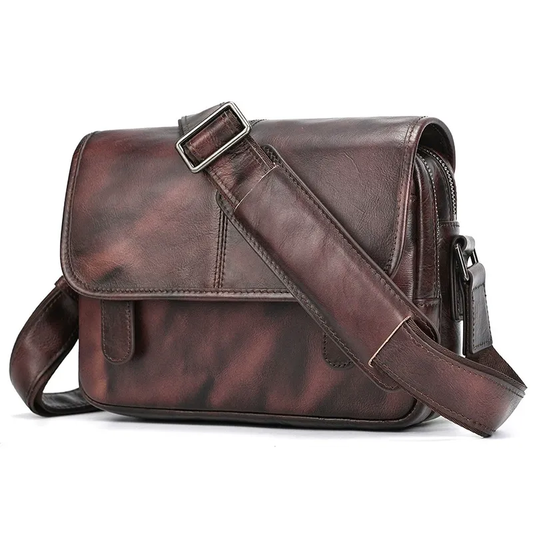
This 2026 guide turns a classic briefcase into a modern professional system. Use the actual laptop, papers, charger, bottle, and personal items you carry, then verify live dimensions and materials on the Woosir product page before ordering.
Start with a realistic daily load
Write down what leaves the house every workday and separate permanent items from occasional ones. A laptop, notebook, charger, keys, phone, and documents may form the core; a lunch container, camera, or change of shoes may belong only on certain days. This list prevents a beautiful briefcase from becoming an oversized container.
Measure the laptop with its protective case and note the largest folder or notebook. A briefcase should close without pressing on the device or bending papers. Leave a little room for movement, but do not choose a much larger format simply because the empty interior looks impressive.
Create four practical zones
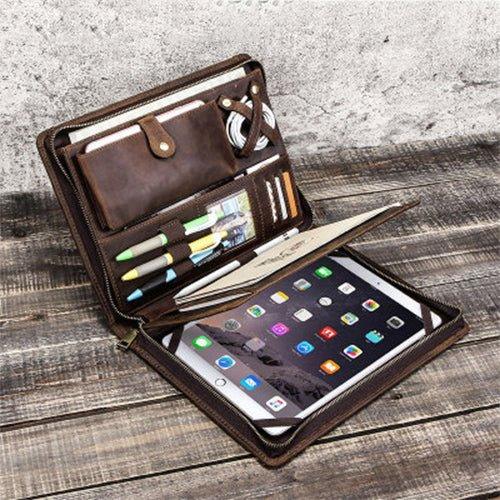
A useful layout usually includes a protected device zone, a document zone, a small-accessory zone, and a personal zone. Keep the laptop close to the back panel, papers in a folder, chargers in a soft pouch, and keys or cards in a pocket that can be reached without exposing everything else.
Use the same map every day. Consistency makes it obvious when a charger is missing and prevents loose objects from rubbing against leather or the laptop. If a pocket is not used for a clear purpose, leave it empty rather than adding clutter.
Protect the laptop and documents
Device protection comes from fit and separation as much as from padding. The computer should not slide into a hard corner, press against metal hardware, or share a sleeve with a charger. Add a slim protective sleeve if the briefcase's divider is soft or if the bag will often be placed on the floor.
Keep documents flat and away from bottles or food. A simple folder can separate signed papers from notebooks and make a meeting change easier. If the briefcase has a wide central cavity, use a structured insert instead of letting papers collapse beneath smaller accessories.
Use access frequency to place small items
Items needed while standing—transit card, phone, pen, or keys—should be reachable from an exterior or upper pocket. Items used only at the desk can stay deeper inside. This reduces the number of times the briefcase is opened fully in a crowded station or lobby.
Avoid placing sharp objects beside leather panels or the laptop. A compact pouch protects cables, adapters, and a mouse while making the set easy to lift out. The best organizer is often a small removable pouch, not a dense field of built-in slots.
Balance the load for comfortable carry
Put the heaviest object close to the body and keep the left and right sides reasonably balanced. A bottle at one end and a dense charger at the other can make a briefcase twist even when the total weight seems acceptable. Test the packed bag by hand and on the shoulder.
If the route includes long walking, use the shoulder strap or a lighter load instead of relying on the top handle for the whole day. Inspect handle anchors and strap hardware periodically because organization cannot compensate for a carry system that is wearing out.
Maintain leather and interior hygiene
Empty receipts, food wrappers, and loose dust before storing the briefcase. Brush away dry dirt and wipe the interior according to its lining material. If a bottle leaks, remove the contents immediately and let the bag air out with every compartment open.
Leather needs controlled care rather than frequent heavy conditioning. Blot moisture, avoid direct heat, and follow the product's care guidance. Store the briefcase with enough support to keep its shape, but do not compress it under heavy objects.
A daily carry reset
A two-minute reset at the end of the workday keeps the system reliable. Return papers to the document zone, put the laptop in its sleeve, check the charger and keys, remove items that belong elsewhere, and note anything needed for the next morning.
Once a week, review the list against the actual routine. If an item has not been used for several days, remove it. A briefcase becomes more comfortable and more professional when it carries only what supports the current workday.
Briefcase organization checklist
- Measure the complete device and document load before choosing capacity.
- Create dedicated zones for the laptop, papers, accessories, and personal items.
- Keep dense objects close to the body and balance the sides.
- Use removable pouches for cables, keys, and small tools.
- Reset and air the briefcase after each workday.


The most useful organization test is a full departure simulation. Put the laptop, papers, charger, bottle, and personal items inside, lift the briefcase from the floor, walk with it for ten minutes, and place it beside a chair. Notice whether the device stays protected, whether papers remain flat, and whether the items needed first are still reachable. Then remove everything and repeat the reset. A briefcase that looks organized but takes several minutes to repack will slowly lose its system. Keep a small pouch for objects that change from day to day, such as adapters or a presentation remote. This protects the stable core layout while keeping occasional equipment from spreading into every compartment. The final test is storage: the bag should remain supported, dry, and ready for the next workday without being crushed beneath heavier luggage.
Related Woosir resources
Use these related Woosir pages to compare current materials, dimensions, care details, and available variants before making a final decision.